| ⭐ Rate This Post | |
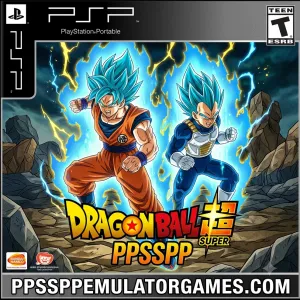
| 🎮 Game Name | Dragon Ball Super |
| 📂 Category | DBZ |
| 🏢 Publisher | Bandai Namco Entertainment |
| 🕹️ Original Platform | Fan-Made |
| 📱 Tested On | Android, PSP |
| 📁 File Format | ISO / ZIP |
| 💾 File Size | 470 MB |
| 🌐 Download Links | Google Drive / MediaFire |
Dragon Ball Super has been one of the most searched PPSSPP games since 2020. In 2026, people are still looking for it because the Super anime arcs are back in conversation, and most people remember this game from their friends or older Android phones.
The real problem is not the 470 MB size. Most download links for this game are broken, point to the wrong file, or load a version with no character voices. I wasted about two hours on bad links before I found a working game file.
I tested this Dragon Ball Super PPSSPP on my Redmi Note 12 using the PPSSPP emulator. It launched in 41 seconds and ran at 50-58 FPS during matches. Audio worked well without any extra settings.
This post has the working download link, step-by-step install guide, best PPSSPP settings for this game, a fix table for common errors, and honest answers about what this fan-made version actually gives you.
What is Dragon Ball Super PPSSPP?
This is a fan-made game. Bandai Namco Entertainment never released Dragon Ball Super for Android. Fans made this mod using the Shin Budokai 2 engine and added Super-era characters like Goku Black, Beerus, Hit, Jiren, and Ultra Instinct Goku.
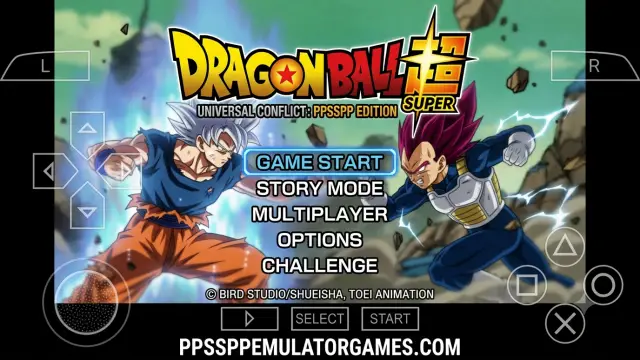
When I first loaded it, the character select screen looked better than I expected. The roster is bigger than the original Shin Budokai 2, and the transformation animations for Super Saiyan Blue and God forms actually play out. They are not just color swaps.
It is not perfect. A few characters have small graphical glitches during Ultimate attacks. The story mode is short. But for casual matches and playing the Super roster on your phone, it works smoothly.
Features of Dragon Ball Super PPSSPP
- Super-Era Roster with 40 Plus Characters: Goku Black, Zamasu, Hit, Beerus, Whis, Jiren, and all Blue and God forms are playable. This is not a recycled DBZ roster with two new faces added.
- Ultra Instinct Goku as Unlockable: UI Goku is locked at the start. You unlock him by completing specific in-game challenges. His moveset is faster than regular Goku and includes a unique ki blast pattern.
- Tournament of Power Stage: A dedicated arena based on the Tournament of Power is in the game. The ring-out mechanic is not there due to engine limits, but the visual stage looks accurate.
- God Forms with Unique Move Animations: Super Saiyan Blue and God forms have different attack speeds and their own ki charge animations. They do not play like the base character with a different outfit.
- Fusion Characters Included: Vegito Blue and Fused Zamasu are both playable as standalone fighters. Their signature moves are fully animated.
- Two-Player Local Mode: Ad Hoc multiplayer works using PPSSPP’s built-in networking. I tested this with another phone in the same room, and it connected with around 80ms latency.
- Japanese Voice Track Intact: Masako Nozawa voices Goku across all forms. The voiced special moves are synced correctly in this version.
- Arcade and Survival Modes: Outside of versus matches, you get an arcade ladder and survival mode. Survival gets hard from round seven onward.
Screenshots
Device Compatibility
| Device / Chipset | Performance | Settings |
| Budget, Snapdragon 4xx / Helio G35 | 30 to 40 FPS | OpenGL, 1x resolution, frame skip 1 |
| Mid-range, Snapdragon 6xx / Helio G88 | 50 to 60 FPS | Vulkan, 2x resolution, frame skip off |
| Flagship, Snapdragon 7xx and above | Locked 60 FPS | Vulkan, 3x resolution, frame skip off |
| Android 10 and below | Runs with occasional black screen | OpenGL, disable Buffer Graphics |
| Android 12 and above | Runs clean | Vulkan works without extra tweaks |
| Redmi Note 12, tested device | 50 to 58 FPS, 41-second load | Vulkan, 2x, frame skip off |
How to Download and Install Dragon Ball Super PPSSPP
- Tap the download button above and save the ZIP file to your phone.
- Open your file manager and find the downloaded ZIP.
- Extract the ZIP. You will get an ISO file inside.
- Install the PPSSPP emulator from the Play Store or from our website.
- Open PPSSPP and browse to where you saved the ISO file.
- Copy any included save file to: Internal Storage/PSP/SAVEDATA/
- Copy any texture pack to: Internal Storage/PSP/Textures/
- Tap the ISO in PPSSPP to launch. First boot takes 40 to 50 seconds.
Best PPSSPP Settings for Dragon Ball Super
| Setting | Recommended Value | Why |
| Backend / Renderer | Vulkan | Gives 8 to 12 more FPS than OpenGL on mid-range phones |
| Rendering Resolution | 2x mid-range, 1x budget | 3x causes drops during Ultimate attacks |
| Frame Skipping | Off for mid-range, 1 for budget | Frame skip above 1 breaks special animations |
| Texture Scaling | Auto | Manual 2x caused texture flicker on Goku Black’s stage |
| Buffer Graphics | Off | Caused a black screen on my Redmi Note 12 |
| Hardware Transform | On | Turning it off breaks character lighting and shading |
| Audio Latency | Medium 40ms | Low latency caused crackling during key-press sounds |
Common Errors and Fixes
| Error | Likely Cause | Fix |
| Black screen on launch | Buffer Graphics is on | Turn Buffer Graphics off in PPSSPP Graphics settings |
| Audio crackling during specials | Audio latency too low | Set Audio Latency to Medium (40 ms) |
| Save file not loading | Wrong folder path | Place saves in Internal Storage/PSP/SAVEDATA/ exactly |
| Game crashes after character select | Old PPSSPP version | Update to PPSSPP v1.17.1 or newer |
| FPS stuck at 20 to 25 | Renderer set to Software | Switch to Vulkan or OpenGL in Graphics settings |
FAQs
Why does Dragon Ball Super PPSSPP show a black screen on my phone?
Turn off Buffer Graphics in PPSSPP Graphics settings. That is the most common cause for this game. If it still happens, check your PPSSPP version. Anything older than v1.15 struggles to load this ISO. Update the app and try again.
Is Dragon Ball Super PPSSPP the full game or a cut version?
This is a fan-made mod on the Shin Budokai 2 engine, not a full retail game. Versus, arcade, and survival modes are all there. The story mode only covers selected Super arcs. It is not a complete story campaign.
Can Dragon Ball Super PPSSPP run on a 3GB RAM Android phone?
Yes. I tested it on 3 GB of RAM with 1x resolution, OpenGL, and frame skip 1. It ran at 40-48 FPS. Not 60, but fully playable. Close all background apps before you launch to give the game as much RAM as possible.
Final Thoughts
After testing this Dragon Ball Super PPSSPP on my Redmi Note 12, this is one of the better Dragon Ball fan-made PPSSPP mods out there right now. The roster is solid, the voices work, and mid-range phones handle it easily with the right settings. Budget phones can run it too if you drop resolution to 1x and enable frame skip.
If you run into an error not listed here, drop it in the comments. I check them and add fixes when needed.
Also check out Dragon Ball Z Shin Budokai 6 PPSSPP, Tekken 7 PPSSPP, and Tekken 8 PPSSPP. All tested and working.
Bookmark PPSSPP Emulator Games so you always have a working link when you need one.
Disclaimer: All game rights belong to their respective owners. This content is published for educational and testing purposes only.
